How CarrierGuard
works
Verify carriers, assess risk, monitor compliance, and protect every load — from first search to final delivery.
How CarrierGuard works
No passwords — every sign-in uses a one-time code
Sign-up requires a valid MC or DOT number
Search and full profile views may be limited
Only you can edit or delete your own reviews
Custom plans are available on request
Team seats are managed from your Profile
Create your account
CarrierGuard doesn't use passwords. Every sign-up is confirmed with a one-time code sent to your email, and new accounts are tied to a real MC or DOT number so the community stays made up of actual carriers and brokers.
- 01From the Login page, switch from the Login tab to Sign Up.
- 02Enter the email you want tied to your account — this is where your verification codes will go.
- 03Choose MC or DOT from the dropdown and type your number.
- 04Select Continue. CarrierGuard checks the number and emails a 6-digit code to your inbox.
- 05Enter the 6-digit code on the verification screen.
- 06If your MC/DOT number could be either role, choose whether you're continuing as a Carrier or a Broker.
- 07Select Verify & Continue — you're signed in.
Didn't get a code? Select Resend Code once the countdown finishes, or Change Email Address if you typed it wrong.
Sign Up
Create an account to search brokers and share your payment experience.
Login
Sign in to search brokers and share your payment experience.
Log back in
Returning is the same passwordless flow, minus the MC/DOT step.
- 01Stay on the Login tab and enter the email your account uses.
- 02Select Send Code — a fresh 6-digit code is emailed to you.
- 03Enter the code and select Verify & Continue.
If you followed a link to a specific company profile before logging in, signing in sends you straight back to it instead of the homepage.
Search for a broker or carrier
The search bar on the homepage looks companies up as you type. Enter at least three characters — a DOT number, MC number, company name, phone number, or email — and matching results drop in below the box with legal name, entity type, active status, and contact details.
Sign-in required
Selecting a result while signed out prompts you to log in or create an account, then drops you straight onto that company's page.
Plan search limits
Each plan includes a set number of full profile views. Once you reach yours, CarrierGuard prompts you to upgrade before opening the next one.
Hawk Lading
(Broker)Jacobs Blading Service LLC
(Carrier)B & R Mowing And Blading
(Carrier)3 results — sign in to view full profiles
Read a full company profile
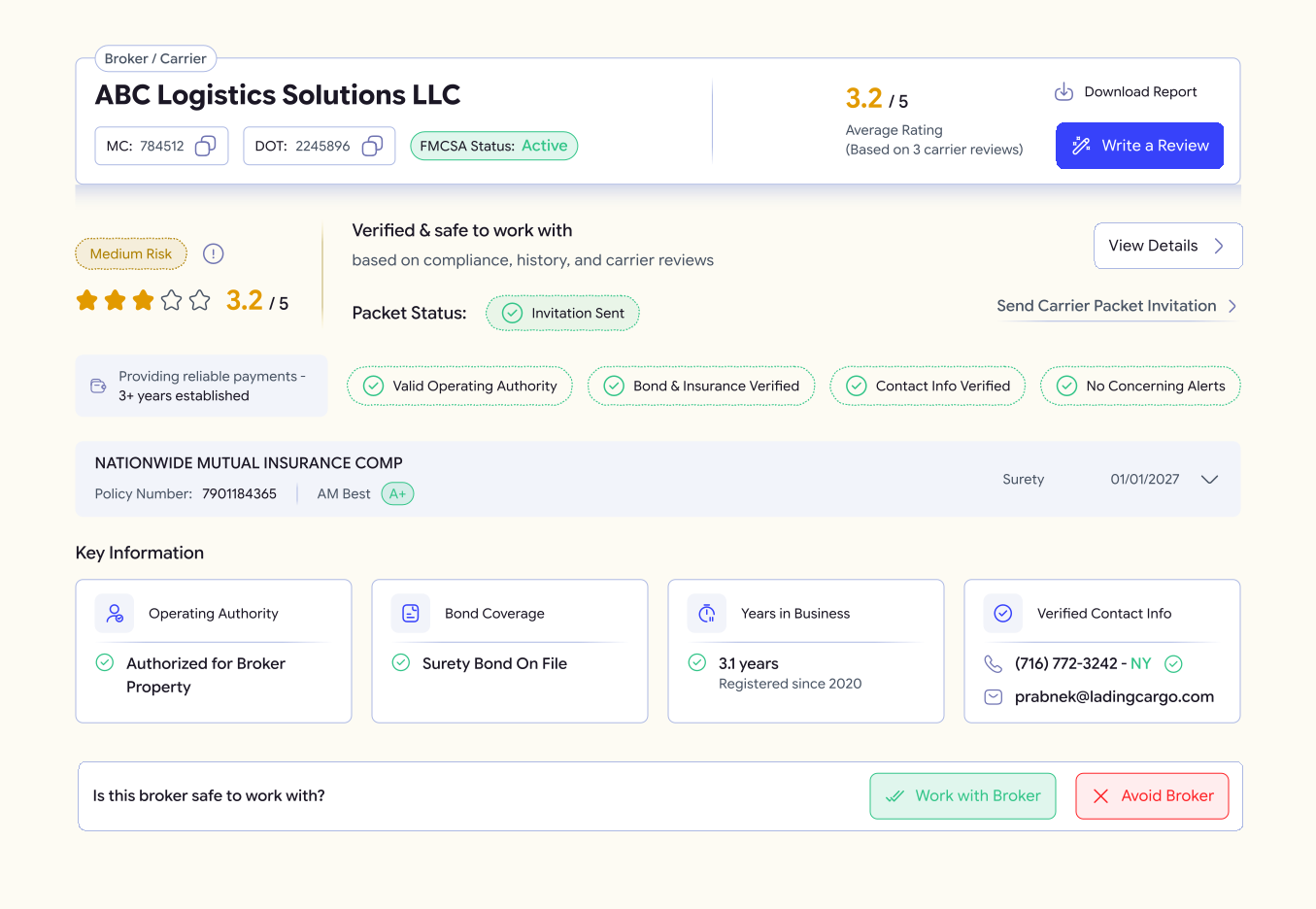
Every company profile is organized into tabs across the top. Here's what lives in each one.
Overview
Would-work-again and recommend scores, plus core company details.
Risk Analysis
A breakdown of fraud-check and risk indicators.
Compliance
Legal status, crash/inspection map, and violation history.
Insurance
Current policy status and coverage details.
Operations
Cargo classification and operating authority.
Activity
History of changes and verified data points.
Reviews
Ratings and written feedback from other carriers or brokers.
Carrier Packet
A shareable one-page company packet.
Locked sections show a preview with a lock icon if your plan doesn't include them.
Download the full report
Select Download Report at the top of any company profile to save a PDF snapshot of that company's data — handy for keeping a record before you book a load.
Report downloads are included on plans that support them. If yours doesn't, you'll see a lock icon in place of the download button.
A+
Safety
Active
Insurance
Valid
Compliance
PDF Snapshot • Timestamped
Rating Distribution
Payment: 32 days
Loads are consistent and rates are competitive. Payment usually comes within a month. Dispatch is responsive.
Payment: 32 days
Loads are consistent. Payment takes slightly longer than stated terms, but nothing excessive.
Reviews and ratings
Reading reviews
The Overview and Reviews tabs show the average rating, a 1–5 star rating distribution, and the percentage of reviewers who'd work with the company again or recommend it.
Writing or editing a review
- 01Select Write a Review on a company's profile.
- 02Fill in your rating and describe your experience.
- 03Submit. Your review posts immediately and is folded into stats.
Managing reviews
- Helpful — Mark another reviewer's review as helpful.
- Report — Flag a review that looks fake or abusive.
- Delete — Remove a review you wrote, any time.
Choose a plan
The Pricing page lists Individual and Team plans side by side, with a monthly/yearly toggle and a full feature-comparison table underneath. Start on the free plan and upgrade whenever your search volume or data needs grow.
Individual
$23/month
Team
$71/month
Enterprise? The Watchtower Apex →
Request a Custom Plan
Please provide your details and our enterprise team will reach out shortly.
Note:
Our team typically responds to Enterprise inquiries within 1 business day. Your information is kept secure and used only for contact purposes.
Request a custom plan
Standard tiers not enough? The top tier on Pricing is built for organizations that need something tailored rather than a fixed package.
The Watchtower Apex
Contact us for pricing
For organizations that need a tailored solution with advanced monitoring, custom integrations, and dedicated support. Included:
- ✓Everything in Fleet Command
- ✓Dedicated API access (TMS / CRM integration)
- ✓Automated continuous watchlist monitoring
- ✓Custom SLA & 24/7 priority support
- 01On Pricing, find The Watchtower Apex and select Contact Us.
- 02Fill in the form — full name, email, and DOT number are required; a message is optional.
- 03Select Send Request.
The enterprise team typically replies within 1 business day.
Manage your subscription
Profile → Subscription is where you view and control your plan: its status, billing dates on paid plans, and everything it includes.
Upgrade — Select Manage Billing to return to Pricing.
Cancel — Select Cancel Subscription and confirm; you keep access until the current billing period ends.
Pending payment — If a plan is awaiting payment, select Complete Payment to finish checkout, or Cancel Payment to drop it.
Team Plan
Renewed Aug 1, 2026
Next Billing
Aug 1, 2026
Seats used
5/10
Plan
Team Annual
Searches
Unlimited
Profile & security
Account
Manage your profile, subscription, and activity
Profile
Name
(IronPath Carriers)
John Carrier
john.carrier@email.com
Phone
+1 312-555-0198
Account Type
Carrier
Joined
January 2026
The Account dashboard is your central hub for personal details and usage tracking.
Update your name, company association, and contact info at any time. Your changes reflect immediately across the platform.
Quick Highlights
- Real-time usage tracking for searches & risk scores
- One-click profile editing and email management
Team members
Profile → Team lists everyone on your account and lets you search by name, email, or role.
- 01Select Add User to invite a new member to your organization.
- 02Define their specific role and access levels.
- 03Manage status toggles to activate or deactivate members instantly.
- 04Set granular permissions for searching, billing, and team management.
Users
Manage platform users and roles.
Sarah Miller
Admin Accesss.miller@logistic-flow.com
James Wilson
Broker Managerj.wilson@fastfreight.io
Maria Garcia
User Accessm.garcia@carrier-pro.net
Robert Chen
WERr.chen@global-haul.com
Permissions — James Wilson
ActiveContact Support
Didn't find your answer? Reach out to our team
Our team typically responds within 24 hours.
Read the FAQ
Browse common questions & answers
Support & policies
We're here to ensure your experience with CarrierGuard is seamless.
Questions?
Our support team is here to help with any issues or questions about your account.
Common questions
Browse frequently asked questions about carriers, brokers, billing, and features.
Ready to protect every load with confidence?
Join thousands of carriers and brokers who trust CarrierGuard to verify, monitor, and protect every transaction.